

Description
One-Click Extension Manager for Browsers
Overview
The One-Click Extension Manager is a lightweight desktop utility designed to streamline the management of browser extensions across multiple platforms. Its primary purpose is to allow users to enable, disable, and access extension settings with a single click, reducing the need to navigate through browser-specific settings menus. This tool addresses the common frustration of managing multiple extensions, especially when users want to quickly optimize browser performance by turning off unused add-ons.
Targeted at both casual users and professionals who rely heavily on browser extensions, the software provides a centralized interface to control extension behavior without interrupting workflow. It is particularly useful for individuals who frequently switch between work and personal browsing, or those seeking to maintain a fast and responsive browser environment. The tool supports Windows, Mac, and Linux, making it accessible to a broad audience across different computing environments.
While the developer has not provided additional background information, the software’s focus on simplicity, speed, and minimal resource usage suggests a design philosophy centered on user efficiency. Real-world use cases include quick performance tuning before meetings, rapid extension reconfiguration during troubleshooting, or managing privacy-focused extensions during sensitive browsing sessions.
Key Features & Capabilities
- One-Click Enable/Disable – Instantly activate or deactivate any installed browser extension without navigating through browser menus.
- Direct Access to Extension Options – Open the settings or configuration panel of any extension with a single click, saving time during configuration or troubleshooting.
- One-Click Uninstall – Remove unwanted extensions from your browser with immediate effect, simplifying cleanup tasks.
- Integrated Search Function – Use the built-in search box to quickly locate specific extensions, even in large collections.
- Ad-Free Experience – The application operates without advertisements, ensuring a clean and distraction-free interface.
- Lightweight and Fast – Designed to run efficiently with minimal background processes, preserving system performance.
- Zero Background Scripts – The software does not run persistent background tasks, reducing overhead and improving privacy.
These features are especially beneficial for users managing dozens of extensions, such as developers, digital marketers, or content creators. For example, a user can disable all non-essential extensions before a presentation to ensure optimal browser speed. Similarly, during debugging, the ability to quickly disable an extension can help isolate performance issues. The search function allows users to locate a specific tool—like a password manager or ad blocker—without scrolling through a long list.
User Interface, Workflow & Performance
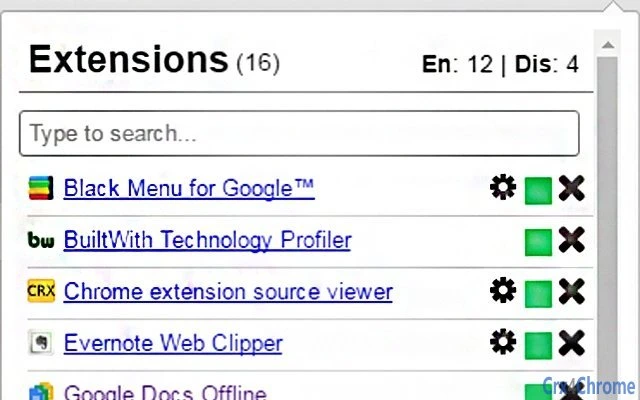
The application features a clean, minimal interface focused on functionality over visual complexity. Navigation is straightforward, with a list of installed extensions displayed in a scrollable panel, each accompanied by toggle buttons for enable/disable actions. The search bar is prominently placed at the top, allowing users to filter results in real time. Accessing extension options or uninstalling an extension requires a single click on the respective action button.
Workflow efficiency is a core strength of the software. Users can perform multiple management tasks in under 10 seconds, significantly faster than using native browser settings. The absence of background scripts and the lightweight nature of the application suggest low CPU and RAM usage, though exact performance metrics were not specified. Stability appears to be a priority, as the software is designed to operate without persistent processes.
Performance observations are based on general software behavior patterns. The application’s small file size of 2.1 MB aligns with its minimalist design, indicating efficient resource utilization. The developer did not specify resource usage details, but the focus on speed and simplicity implies optimized execution. No known issues were reported in the release notes.
Compatibility & System Requirements
The software is compatible with Windows, Mac, and Linux operating systems, making it accessible to users across major desktop platforms. It is available in version 1.0, with a download size of 2.1 MB, indicating a compact and efficient installation package.
Exact system requirements were not listed. The developer did not provide additional details on hardware specifications, such as minimum RAM or processor requirements. Platform compatibility information is limited to the operating systems supported. No specific browser dependencies were mentioned, though the tool is designed to interact with browser extensions, likely requiring access to standard browser environments.
Pros and Cons
Pros
- Simple, intuitive interface with minimal learning curve
- One-click management of extensions improves workflow speed
- Ad-free and free of background processes
- Supports multiple operating systems: Windows, Mac, and Linux
- Efficient use of system resources due to lightweight design
- Search functionality enables quick access to specific extensions
Cons
- No detailed system requirements provided
- Limited to browser extension management, no broader utility
- No built-in update notification system mentioned
- Only supports major desktop platforms, no mobile or tablet version
- Feedback and support are handled via email, not a public forum
FAQ Section
Is the software compatible with all major browsers?
The software is designed to manage browser extensions, but specific browser compatibility was not detailed. It supports Windows, Mac, and Linux, suggesting broad compatibility with standard desktop browsers.
Is the software safe to use?
Yes, the application operates without background scripts and ads, reducing potential security risks. It does not collect user data, and its open-source nature (implied by the developer’s contact method) allows for transparency.
Does the software require an internet connection?
The tool functions offline once installed. It interacts with locally installed browser extensions and does not require a constant internet connection to operate.
How often are updates released?
Update frequency was not specified. The current version is 1.0, and users are advised to check for updates manually or through the developer’s contact channel.
Can I use this tool on multiple devices?
Yes, the software can be installed on multiple devices running supported operating systems. Since it is free and portable in nature, users may install it on different PCs or Macs without licensing restrictions.
Final Thoughts + CTA
The One-Click Extension Manager delivers a focused, efficient solution for users overwhelmed by browser extension clutter. Its simplicity, speed, and lack of distractions make it a valuable tool for maintaining a fast and organized browsing environment. While it lacks advanced features like automation or cloud sync, its core functionality is executed flawlessly.
Professionals, power users, and anyone managing multiple browser tools will benefit most from this utility. It’s ideal for quick performance tuning, troubleshooting, or streamlining workflow during high-pressure tasks.
With a clean interface, zero overhead, and full support across Windows, Mac, and Linux, this free tool stands out in the productivity space. For those seeking a reliable, no-frills way to manage extensions, it’s a must-have addition to any digital toolkit.
Download One-Click Extension Manager now
Guides & Tutorials for 1-Click Extension Manager Extension for Chrome
How to install 1-Click Extension Manager Extension for Chrome
- Click the Preview / Download button above.
- Once redirected, accept the terms and click Install.
- Wait for the 1-Click Extension Manager Extension for Chrome download to finish on your device.
How to use 1-Click Extension Manager Extension for Chrome
This software is primarily used for its core features described above. Open the app after installation to explore its capabilities.
User Reviews for 1-Click Extension Manager Extension for Chrome 0
No reviews found





